Forex Trading App Development with Crypto Wallet: Features, Cost & Benefits
Key takeaways: The UAE is a serious market for fintech and digital-asset products. DIFC alone hosted 1,677 A [...]
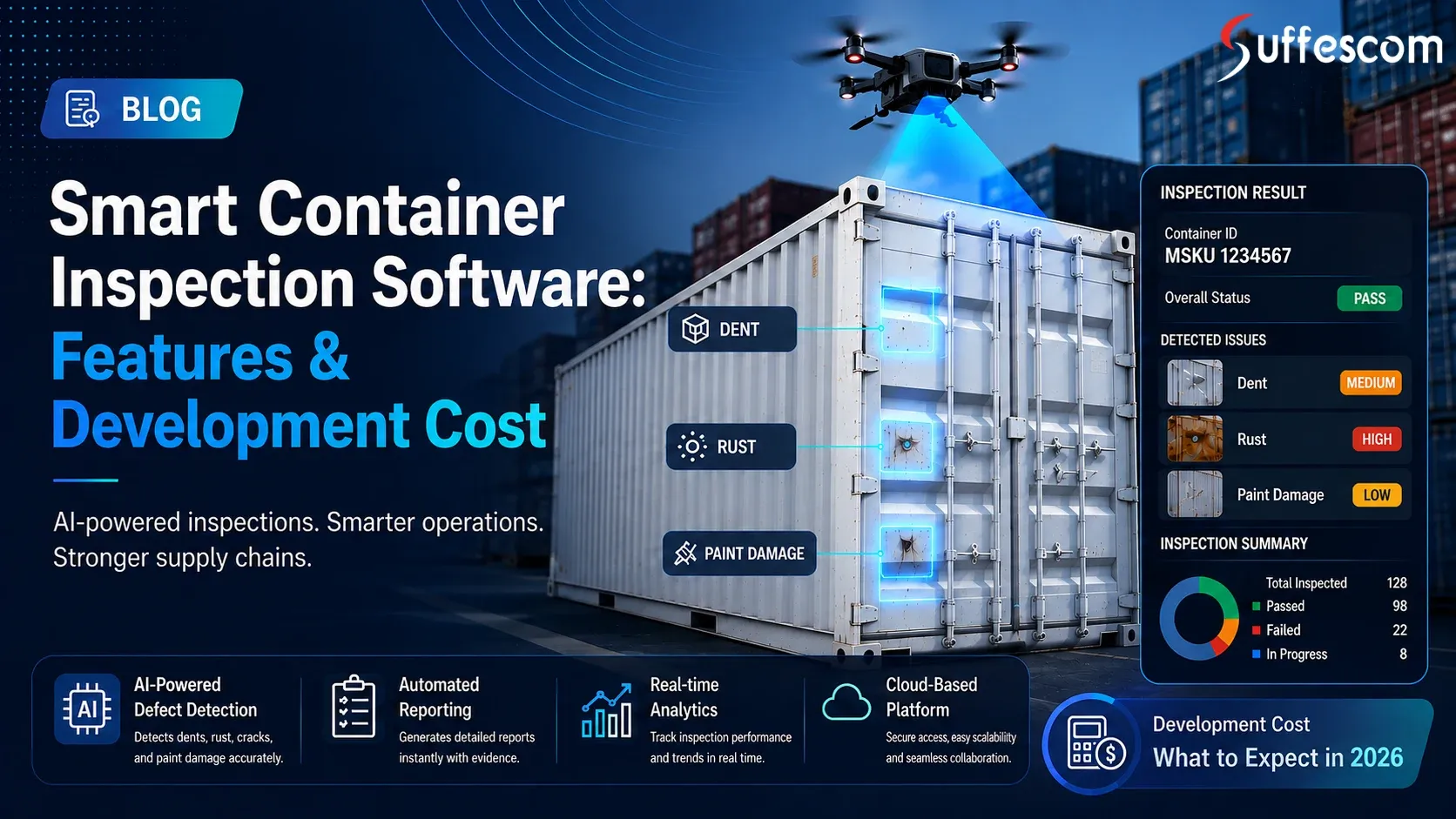
If there is any damage to a container, a simple shipment can become an expensive issue. Damage and tampering can cause cargo losses, disputes, delays and compliance headaches if not detected. That's where smart container inspection software is changing the game. Container inspection software development provides AI, computer vision, mobile workflows, and real-time data to speed up and standardise inspections.
This opportunity is expanding in parallel with the growth of the smart container market. The global smart container market is expected to grow at a 19.5% CAGR from 2021 to 2026 and is estimated at $39.17 billion by 2036.
Now, the question for ports and logistics companies is not whether to go digital but how to create the right solution. Let's discuss some of its essential features, development process, and cost.
Smart container inspection software is a digital solution for the ports, shipping companies and logistics operators to inspect container condition, document container damage and manage container inspection records from one system. Our logistics app and software development process integrates mobile devices, cameras, AI, computer vision, OCR, IoT and inspection databases. This transforms the physical inspection process into a structured digital one.
Traditional manual container inspection
It is based on human visual inspection of containers and damage documentation on paper forms or simple spreadsheets. Experienced inspectors are still essential, but this can cause issues with data consistency, duplicate data entry and historical data retrieval.
Digital container inspection
It replaces paper with mobile or web forms. Inspectors are able to photograph and scan container numbers, document damage, add a timestamp and create reports from the field. But the inspection may still be completely subjective.
Automated inspection
It introduces the concept of AI and computer vision. Images or videos are available for analysis to look for any visible defects, and container ID numbers can be read automatically using OCR. The inspector can then review the AI-generated results without manually recording each one.
These features are integrated with terminal operations, maintenance and asset management systems through an automated inspection workflow. The general process would be:
Capture → Identify → Detect → Review → Report → Store → Act
A modern container inspection system could include the following:
This provides a whole container record of its condition, not a single inspection report.
The following are some of the benefits that an effective platform can offer an organisation:
Smart inspection isn't just about detecting damage using AI. It is enabling structured and searchable, actionable information that can assist with quicker decision-making throughout the logistics operation.
Smart container inspection management software should be able to allow for inspection standards and practices relevant to the container owner, terminal and jurisdiction. CSC (International Convention for Safe Containers) is the international procedure for the approval, examination and maintenance of containers.
The inspection workflow should rely on a universal damage taxonomy, including dents, holes, corrosion, cracks, structural deformations and component damage. IICL inspection and repair practice may be used to standardise damage assessment, decisions on repair and the documentation of the inspection carried out.
If the platform is being operated under an Approved Continuous Examination Programme (ACEP), it must maintain examination dates, container identification, examination findings, repairs, re-examinations and supporting evidence. The procedures of ACEP also mandate records and processes for failed containers that are appropriate.
The Equipment Interchange Receipt (EIR) must be included in the electronic inspection trail, which should link container condition, photos, damage reports, dates and interchange data. This ensures a clear process from inspection to EIR, repair decision and re-inspection.
With growing volumes in containers, it is more difficult to ensure manual inspection of them on busy terminals and logistics networks. This move towards container inspection automation isn't just about replacing inspectors with AI. It's all about decreasing repetitive efforts, establishing trustworthy inspection data and providing improved visibility of conditions in containers.
Manual processes can leave inconsistencies in the records as inspectors may find and describe the same damage in different ways. It can be difficult to read handwritten notes, photos can be lost, and information can have to be re-entered into other information systems later.
This poses some challenges:
These disparities can make reliable container damage assessment more difficult for organisations with thousands of containers.
AI inspection involves computer vision technology to analyse images or videos of containers and detect any visible defects, like dents, holes, corrosion, or deformities. Automated image processing can also contribute to the standardisation of capturing and categorising inspection evidence.
However, Artificial Intelligence should not be used to replace skilled inspectors. Human verification may be needed in case of unusual damage, poor lighting, obstruction and unclear images. A practical AI-enabled inspection software workflow can then mark potential damage for review so that the inspector can make the final decision.
A digital inspection record will give significantly more evidence than a handwritten report. Each inspection may be related to:
This provides a documented history of condition which can assist teams to establish when and where damage has been documented. As a shipping and logistics company, improved evidence can streamline the claims investigation and resolution process while making it more structured and efficient.
Automated inspection systems can deliver the results of the inspections directly into the operation dashboards and connected logistics platforms. Teams don't have to wait until paperwork gets to another department to know if an inspection has been made, what damage has been found, what reviews are pending, or which containers need attention and do it in near real-time.
This visibility enables terminal operations to plan inspections with yard movements, maintenance and repair planning, and container release. Inspection data can also be used over time to identify injury trends that can help with improved asset management decisions.
That means a more integrated inspection system that detects damage, reports it and enables operations decisions to be made within the same digital workflow.
A modern smart container inspection software solution should be more than just a paper form replacement. It should integrate AI, image collection, inspection processes, operation systems and history, allow teams to inspect containers consistently and take action quicker based on the results. There are several features that are especially critical for a scalable container inspection system.
With the help of AI-based inspection software, the visible defects like dents, holes, cracks, corrosion, and deformation of the container can be identified from the container image. It can also highlight any potential problems for inspection by the inspector, aiding teams to manage greater volumes of inspections and not lose sight of human judgement. The success of detection is highly reliant on training data, image quality, lighting conditions, and what kind of damage the model has been trained to identify. Therefore, the results produced by AI should not be extrapolated as definitive conclusions, but rather as aids to inspection.
Computer vision is a technology which allows container inspection to be automated through the analysis of photographs or video taken during the inspection. Depending on the model, it can recognise damage patterns, classify the defects and mark areas for further inspection. This is useful at busy inspection points where it may be impractical to manually inspect each image, making computer vision container inspection useful. Uses inspection data, labelled appropriately, to improve models over time.
OCR technology can be used to read an identification number from an image captured and link it to the correct inspection record. This will minimise repetitive typing and decrease the chance of entering the wrong numbers for containers. Or the system can check the number against the expected format prior to saving the inspection. This provides a more streamlined connection between the physical asset and digital inspection history.
The container inspection app enables inspectors to carry out container inspections directly on their smartphone or tablet at the inspection site. They no longer need to fill out paper forms to take photos, complete checklists, make observations, and report on inspections. The mobile app development also offers step-by-step instructions for conducting the inspection and may have required fields for the inspector to fill out, enabling consistency in the inspection process. The inspection record can be further enhanced by GPS, timestamps, camera access and electronic signatures as necessary.
Smart systems can capture damage sites and, if supported by a computer vision model, determine the dimensions of the damage. Visual markers, coordinates or pre-defined container zones may be useful in describing precisely where a defect occurs. This information provides repair teams with more useful information than a generic description like "side panel damaged". It can assist in maintaining a more uniform and comparable measurement of container damage and assessment of repair.
This software can automatically generate a digitised report that includes inspection information, photos, damage classifications, time-stamps, and inspector information in a structured format. Reports may be created on the spot as opposed to being written up later. Inspection evidence can also be more easily searched, shared and retrieved as needed for maintenance, claims, audits or operation reviews, with a centralised reporting system.
Workflow management regulates the processes that take place before, during, and after an inspection. For instance, if a container is marked for significant damage, it will automatically be flagged for secondary inspection, repair assessment or the approval of a supervisor. This eliminates the need to manually coordinate each step by the employees. The software can also be configured to carry out various inspection processes in different terminals, yards and logistics operations.
Real-time dashboards can display inspection volumes, inspections completed, damage detected, inspections pending, and inspection turnaround. This data can be used by supervisors to select bottlenecks and track the performance of operations. Historical analytics can identify container damage trends based on container types, locations, routes or operational phases. These learnings can help with improved asset management and maintenance planning.
Role-based access control allows inspectors, supervisors, repair crews, administrators and all other users access only to those features and information that are relevant to their role. This assists in the control of each inspection team while operating as a large group. Permissions may also include who can create, edit, approve, export and delete inspection records. This is important for maintaining data integrity and accountability.
Multi-camera inspection systems can inspect multiple sides or sections of a container in a single inspection event. You can get a wider viewing angle and decrease blind spots with multiple cameras. In high-throughput facilities, cameras can be placed around the inspection lanes to allow for containers to be captured as they pass through specific inspection areas. The resulting images can then be analysed, either individually or together.
Some use edge AI to process images near the inspection device and not all images on a remote cloud server. This can help to decrease reliance on network connectivity and aid in quicker initial processing. Offline is also helpful in yards or inspection areas that have unreliable connectivity. Inspectors have the ability to store and retrieve information locally and to synchronise with the central system when the system is connected.
A smart port software platform can be integrated with the terminal operating systems, gate systems, maintenance platforms and other logistics applications via APIs and share the inspection data. This minimises duplicate data entry and facilitates inspection results to be integrated into broader terminal workflows. Integration also can assist in synchronising inspection results with the release, movement, maintenance or exception handling processes of containers. The exact integrations will depend on the technology environment of each port or terminal.
The inspection platform might need to integrate with the organisation's port, terminal, logistics, and customs systems for UAE deployments. Therefore, integration should be around available APIs, security aspects, data formats, and approval processes. A flexible integration layer facilitates ease of integration with existing infrastructure systems without having to rebuild the entire inspection system. This is particularly significant for companies with various facilities and different types of technology.
A central inspection database can keep a history of the condition of each container that has been inspected, the previous damage, what repairs were done and photos, and when it was inspected. This history can be utilised by teams to gain insight into asset condition changes over time. If there is enough good data, analytics and machine learning can be used to detect patterns of damage and can help with predictive maintenance approaches.
Smart alerts can alert the appropriate team to serious damage, failed inspections, missing information, or other specified conditions. Depending on the workflow, notifications can be sent via the platform or in conjunction with communication systems. Significant events like inspection submissions, modifications, approval and report updates are recorded on the audit trails. This establishes a history that can be traced of the digital container inspection process and enhances operational accountability.
Basic core inspection functions can turn a platform into something that works, but the more advanced features can add value for operators with big container fleets. Technology should focus on converting inspection results into actionable data for repair, maintenance, planning and asset management, not just for technology's sake.
AI can then identify and classify damage, which can be input into a configurable repair estimation engine that takes account of damage type, size, location, repair method, labour rates, material costs, etc. This can assist maintenance teams in prioritising and preparing work estimates quicker.
The calculated amount should be used as an operational guide and not as a guarantee of repair costs. Actual costs will depend on physical inspection, local rates, the quality of repair, parts and the amount of underlying damage.
If the defects can be displayed as a 3D container model, then an interactive display of the location of individual defects throughout the structure of the container can be achieved. Damage coordinates can be assigned to particular panels, doors, roof sections, or other areas, which facilitates understanding of the inspection findings.
Through comparison with past inspections, repair planning and dispute evidence, the same model can be used to demonstrate the change in the container's condition between inspections. Commercial container inspection platforms already support 3D damage visualisation in addition to structured damage classification and automated reporting and are a practical differentiation feature.
Historical inspection data can highlight patterns which may not be evident from individual reports. A predictive maintenance module can look at the frequently damaged regions, repeated types of repairs, high-maintenance containers, and repeated damages in specific regions or operations.
Such tips can assist maintenance teams in prioritising maintenance and repairs before they become more expensive due to recurring issues. Such predictions will be reliable only if adequate and accurate inspection data from the past exist.
A digital twin can be linked with a larger digital representation of containers and other terminal assets that are relevant to the inspection process. Rather than having damage as an inspection entry on a worksheet, teams are able to view the condition, history, location and related maintenance information for an asset in a connected environment.
For instance, the digitised model of a container can be used to connect inspection images, defects, repairs, movements and maintenance events. This sets the stage for more complex smart port software, asset tracking, and data-driven decision-making on operations.
The best way to understand AI container inspection is as a series of related actions, not one particular model. The system gathers visual evidence, determines the appropriate container, analyses potential damage, certifies the results and produces a structured inspection report. The process may be performed using fixed or mobile cameras, OCR, computer vision, cloud processing or edge AI, depending on the deployment.
It begins with the shooting of photographs or videos of the container from a mobile, fixed camera or a multi-camera inspection setup. Images should include all relevant portions of the image, including doors, side panels, corner posts, roof sections, and other areas for inspection as needed by the operator.
The results of AI container inspection are directly related to image quality. Damage may be difficult to detect due to poor lighting, dirt, shadows, the camera shooting at the wrong angle, or other factors. The system has the ability to also add the time, place, and inspection ID to the images that are captured.
The system needs to determine the physical container to examine before analysing the damage. OCR can recognise the ID number on the container and match it with the appropriate digital inspection record.
The platform can then fetch relevant details like previous inspections, damage to the asset, history of repairs, and asset status. This will give a useful context before the new inspection and establish a consistency between the physical container and its digital record.
The captured images are analysed using computer vision models to detect any potential defects like dents, holes, cracks, corrosion, scratches, or deformation. Areas of interest can be emphasised, and detected problems can be categorised based on pre-defined damage classes.
This promotes uniform damage detection of containers within huge inspection volumes. However, the performance of the model is dependent on the training data, the quality of the image, variations in the container, and the type of defect the system was trained to identify.
If a possible defect is identified, the system can determine the location (when possible) of the defect on the container and, if available, approximate the size of the defect. The coordinates, the zone of containers, the bounding boxes or visual markers can represent the location.
This will make the inspection record more helpful to repair teams. The system can not only record the damage of a container but also display the approximate position, size and image evidence of the damage.
Confidence levels can be given to the AI conclusions, and cases that are less certain can be passed to an inspector for review. The inspector will be able to confirm, reject, reclassify or add observations to the finding prior to submission.
This human-in-the-loop method is crucial as real inspection environments are never ideal. Factors like poor visibility, abnormal damage to the containers, obstructions, unfamiliar conditions in the containers and flaws in the model's training data may yield ambiguous results. Human validation is an extra control point for automated container inspection.
AI should assist inspectors, not automatically replace them. An optimised enterprise approach should be AI-driven inspection and validation by humans for doubtful, complex, or high-risk results.
Once validated, the system can then automatically generate a structured digital inspection report. The report can contain container number, inspection time and location, photos, damage categories, measurements, damage locations, inspector details, and observations.
Reporting is automated to minimise administrative tasks and provide important evidence that will be linked to the inspection record. The reports can then be sent to the maintenance, terminal, claims or logistics teams, depending on the workflow set up.
The inspection information is entered into a central database with archived information for the same container. This builds up a very detailed condition history over time, with inspections, any damage found, repairs made, photographs taken and other relevant events.
This historical data can be used to help with trend analysis, identifying recurring damages, planning maintenance, and asset management. It can also be helpful for providing labelled data to assist with computer vision models if the organisation adheres to the proper practices of data governance and validation of the models.
The entire process transforms the visual inspection into a comprehensive AI-based inspection software process. Perhaps most importantly, it provides the inspector with a human touch where it's needed and allows AI to do repetitive image analysis and data processing at scale.
The technology that powers custom software development should address three critical needs: Data capturing reliability, quick AI processing, and secure coupling with the existing logistics systems. Examples of the technologies that might be used in a typical architecture are:
| Layer | Possible technologies |
| Web frontend | React, Next.js, Angular |
| Mobile | Flutter, React Native, native Android/iOS |
| Backend | Node.js, Python, Java, .NET |
| AI/ML | Python, PyTorch, TensorFlow, OpenCV |
| Computer vision | YOLO-family models, segmentation models, OpenCV |
| OCR | Cloud OCR or custom OCR pipeline |
| Database | PostgreSQL, MySQL |
| Image storage | AWS S3, Azure Blob, Google Cloud Storage |
| APIs | REST, GraphQL |
| Infrastructure | AWS, Azure, Google Cloud |
| Analytics | Power BI, Looker, custom dashboards |
| DevOps | Docker, Kubernetes, CI/CD |
The container inspection platform is used to process information such as the work situation, photos, video, user information, data exchange with the port or logistics, etc. Therefore, security must be built-in into the architecture and can't be retrofitted. The controls should also align with the regulation, contractual, and data governance needs of the organisation.
Role-based access control restricts the functions that are available to the system and inspection records based on the role of the person accessing the system. Different permissions may be assigned to inspectors, supervisors, administrators and repair teams to limit access to sensitive data related to operations, unless it is necessary. Access should be managed on the principle of 'least privilege', and access should be reviewed upon the change of roles and departure from the organisation.
Inspection data should be protected during transmission using secure protocols such as TLS. Encryption at rest is also recommended for stored inspection records, photos and videos to minimise the effects if they are the subject of unauthorised access. Encryption keys need to be stored securely and regularly changed in line with the security policies of the organisation.
Strong authentication and authorisation mechanisms must be implemented for the API linking the inspection platform to TOS, customs, maintenance or logistics platforms. Access control of system-to-system communication can be achieved through API keys, OAuth 2.0, short-lived tokens, and access scopes. Common API security risks can be further mitigated through rate limiting, input validation and continuous monitoring.
Audit logs should capture significant activities, including login, inspection submissions, changes to records, approvals, administrative actions, etc. They serve as a means of documenting logins and are useful in tracking back security incidents or unauthorised changes. The log should be guarded from unauthorised changes and should be stored following the defined compliance requirements.
Photographs and video may include operationally sensitive information, which should be restricted in access to users depending on their roles and business needs. Other protections can include object-storage permissions, signed URLs, access expiration and download controls. It should also not allow public inspection of the inspection media due to ill-set permissions on the storage.
The length of time to keep inspection records, images, video and audit logs should be specified by organisations. Retention periods should be based on operational requirements, contracts, rules and regulations and storage costs. Any data that is no longer needed should be securely erased or anonymised as per the approved data retention policy.
Backups of critical inspection databases and associated records should be performed regularly to ensure that accidental deletion, system failures and security incidents do not damage these records. Recovery plans for essential inspection services should also be delineated in the disaster recovery plans, including recovery objectives and procedures. The idea of periodic recovery testing is important because if the organisation is not able to keep the back-up, then it is useless.
AI models need to be continually monitored after deployment. The teams should monitor the following metrics: detection accuracy, false positive, false negative, model drift, performance in various lighting conditions, container types, and damage types. This can be useful for detecting when a model is starting to degrade in performance or when retraining a model might be needed.
Human validation should be included in the process for high-risk findings. Additionally, documenting model versions, training data updates, validation outcomes, and major changes can aid in responsible governance of AI-powered inspection software and ensure trust in automated inspections.
The price of container inspection software development varies widely, typically ranging from AED 100,000 to AED 1,500,000+ based on the scope of the product, AI capabilities, integrations, mobile apps, camera infrastructure, and volume of inspections. The following are planning ranges only, and the final price will depend on the precise technical specification.
| Product scope | Estimated cost in AED | Indicative timeline |
| Basic digital inspection MVP | AED 100,000–150,000 | 3–4 months |
| AI-assisted inspection platform | AED 150,000–200,000 | 5–7 months |
| Advanced enterprise platform | AED 200,000–300,000+ | 8–12+ months |
Initial MVP functionality can feature digital forms, image capture, container identification, reporting, and more, whereas enterprise-level platforms can include AI damage detection, OCR, multi-camera inspection, predictive analytics, and enterprise integration.
The software development scope estimated above should not be interpreted as the total project investment and is only a guide to software development scope. Companies implementing a camera inspection or AI-based inspection system need to allocate a separate budget for the physical and infrastructural aspects.
The image capture equipment, such as fixed inspection cameras, OCR scanners, lighting systems, and others, can incur hardware expenses, depending on the inspection setup and the required coverage.
If low latency or limited connectivity is a requirement, edge AI might necessitate local GPU-equipped servers or dedicated processing units to analyse images closer to the inspection point.
For high-resolution images and video, dependable wired or wireless connectivity, a switch, bandwidth and a secure connection between inspection point and backend system may be necessary.
Costs for clouds can consist of compute, databases, object storage, backups, AI inference and data transfer. As the volumes of inspections increase, storage and processing needs will grow.
All types of camera calibration, replacement of equipment, software upgrades, repairs and periodic hardware maintenance are a continuing operation cost and not a software development cost.
This separation allows for a more clear understanding of the cost of the container inspection and enables companies to plan the software investment and broader deployment investment separately.
| Component | Approx. share of budget |
| Business analysis & UX | 8–12% |
| Web/mobile development | 20–25% |
| Backend & APIs | 15–20% |
| AI/computer vision | 20–30% |
| Integrations | 0–20% |
| QA & security | 18–12% |
| DevOps/deployment | 5–10% |
Talk to our experts to validate your inspection workflow and AI requirements.
More sophisticated AI requirements, enterprise-level infrastructure, or integrations will lead to a higher cost for the container inspection. The top cost factors are:
Custom AI model training
For reliable damage detection in various container conditions, relevant inspection data, model training, validation, and ongoing optimisation of the custom AI model are necessary.
Large annotated image datasets
It's difficult to gather, classify, label, clean, and ensure the quality of high-resolution images for large AI datasets that are needed to train and validate AI models.
Multiple camera feeds
Having multiple camera feeds makes the development more complex as the platform needs to coordinate with the hardware, synchronise image feeds, process the images, store them and integrate the camera.
Edge AI
In addition to the deployment and device-management infrastructure, Edge AI demands specially designed processing devices, model optimisation, local inference, and more.
Offline mobile capability
Local data storage, background synchronisation, conflict handling and reliable recovery when the mobile device reconnects to the network are all essential features of offline functionality.
TOS/ERP integration
The integration with TOS or ERP systems can add to the expenses, as it might involve additional API development, authentication, data mapping, integration with workflows, and testing.
Multi-tenant architecture
In a multi-tenant system, there is a need for secure separation of customer data, tenant-specific configurations, permissions, billing logic and infrastructure that is scalable across organisations.
Advanced analytics
To convert the information from the inspection into actionable information, more data pipelines, dashboards, reporting logic, predictive models and business intelligence will be needed.
3D visualisation
Specialised modelling, rendering, interactive interface and processing requirements for displaying container structures and mapped damage are added in 3D visualisation.
High availability
Systems that need to be highly available must include redundant infrastructure, failover capabilities, load balancing, continuous monitoring and reliable disaster recovery processes.
Enterprise security
Highly sophisticated identity management, encryption, vulnerability testing, audit control, compliance and constant security monitoring may be requirements for enterprise-grade security.
Multi-language support
The multi-language functionality adds a layer of complexity to development, as it requires the interface, inspection form, report, notification and administrative content to be localised and kept consistent.
Buying a share in the platform does not constitute an investment. As inspection volumes and the requirements of the business evolve, an AI-powered inspection software solution needs to be managed and maintained, including for infrastructure, security, and model monitoring.
Cloud hosting
Cloud hosting encompasses application servers, databases, image and video storage, backups, and more to ensure the platform continues to function.
AI inference
When cloud models are used to process multiple inspection images or video in the daily workflow, the cost of AI inference can be recurring.
Model retraining
The AI models can be updated periodically if new types of damages are identified, new containers are introduced, the environment changes, or new labelled inspection data is collected.
Monitoring
Continuous monitoring ensures that teams can monitor application performance, infrastructure health, storage usage, API availability and AI model behaviour after deployment.
Bug fixes
Ongoing bug fixes resolve problems found in actual operations and help to keep the inspection workflow stable between all supported devices and environments.
Security updates
By applying regular security updates, the application, APIs, mobile devices, libraries and infrastructure are kept safe from new vulnerabilities.
Technical support
Technical support helps inspectors, administrators and operational staff to resolve system-related problems, configuration issues, user access and workflow-related issues.
Third-party API costs
Recurring usage-based costs or subscription fees may also be incurred from external services for OCR, cloud AI, messaging, mapping, storage or other integrations.
Device and camera maintenance
Inspection hardware will need to be periodically calibrated, their firmware updated, data connectivity verified, and replacement and physical maintenance performed in order to ensure reliable data capture.
Want a more accurate estimate? Provide your anticipated volume of inspection, AI requirements, integrations, and target deployment model, and a detailed development estimate will be provided based on the AED.
The most effective approach in reducing the expenses for smart container inspection management software development is to steer clear of creating all of the advanced features from the start. Using a phased approach allows businesses to test the inspection workflow, assess the performance of AI tools, and scale the platform as needed for their operations.
An MVP should be designed for what is needed to run an inspection properly and to record it. This can range from container identification and image capture, basic damage detection, and inspector verification to digital reporting, a dashboard, and user management.
These capabilities can be implemented first without the need to deploy complicated features like 3D visualisation, predictive maintenance, or multi-terminal integrations. AI-assisted MVP development should be used in the first place to aid inspectors, not to take over all inspection decisions.
A modular design enables building up and upgrading the bigger functionalities one by one. The platform is capable of dividing into well-defined modules: AI, inspection, reporting, integrations and analytics.
This helps to minimise the need to redesign the entire application each time a new AI model is added, an enterprise integration is required, or an analytics feature is desired. It also helps in future scaling and maintenance.
Instead of investing a lot of money into AI container inspection, carry out a controlled proof of concept with representative container images and the target system. The dataset must be diverse in both lighting and container type, camera angle, and damage categories.
This can help to decide if the computer vision model can deliver useful performance before investing in infrastructure and automation. This is when the results should be confirmed by human inspectors.
One of the biggest cost drivers in enterprise integration can be the development. A pragmatic solution is to start with the one core system, test the data flow, and then extend to the other TOS, ERP, customs, maintenance or logistics systems.
The phased integration helps minimise implementation risk and helps the business discover data-mapping or workflow problems before migrating to a broader technology landscape.
Smart container inspection software development is not only about implementing AI in a mobile app. To understand the inspection process, the evidence that inspectors require, the need for data to flow between systems, and where AI can offer reliable support. The operational requirements are translated into a viable and scalable product using a phased approach.
The first step is to grasp the entire inspection process, from the arrival of containers to the end reporting. The team creates maps of the inspection checkpoints, damage categories, approval steps, users, equipment and existing systems.
Workflows also need to include any exceptions like damaged containers, failed inspections, connection problems, and situations that need supervisor approval. This will ensure that key operational needs are not missed during development.
The interface should be designed based on real conditions of inspection and not office conditions. The inspectors can have to work on the outside, wear gloves and work with mobile devices or under time constraints, so simple navigation and quick data capture is essential.
The design should aim to eliminate unnecessary typing and facilitate easy actions like taking photos, marking damage, viewing AI findings, and submitting reports. Testing with real inspectors can assist in uncovering workflow issues at an early stage.
The team identifies the type of damages to be detected and the type of image data to be used before choosing an AI model. Appropriate training and validation sets should be created by collecting, labelling, cleaning, and dividing representative images.
The dataset should contain the actual data that can be used in actual scenarios like various types of containers, lighting, camera angles, weather, and level of visible damage. A plan should also be put in place to ensure that the findings from AI are reviewed by inspectors when they're unclear.
The initial working prototype can be the identification of containers, capturing of images, inspection forms, simple damage detection, inspector verification, generation of digital reports, dashboards and user management. This will make an effective base without immediately investing in all the advanced features.
The MVP shouldn't just meet technical requirements; it should meet the real inspection workflow. Early user feedback can then help to direct the features to be improved and added in the future.
After the basic workflow is working well, the computer vision model can be used to assist in the inspection process. The system can inspect images, detect potential defects, classify and give confidence scores, and pass potentially ambiguous images to human inspectors.
The integration should also include the outputs of the models and results of the validation so the team can track performance over time. Thus, the AI container inspection workflow is set up for further enhancement following deployment.
The platform has secure APIs for integration with TOS, ERP, maintenance, customs or logistics. Relevant information, including container identifiers, inspection status, damage findings and maintenance actions, should be able to be shared between connected systems via integration.
All integrations must be authenticated, data checked for accuracy, errors caught and handled appropriately, and compatibility with the system tested. Dismantling the terminal can be done in stages, which minimises disruptions to existing terminal operations.
Tests should not be limited to just application functionality. Teams require testing the accuracy of AI, mobile performance, image quality, API reliability, security, offline performance and various operating conditions.
When assessing AI testing, it is important to consider the accuracy of the test but also the number of false positive and false negative results on representative datasets. Additionally, human inspectors should be involved in the usability and workflow validation before deployment into production.
Real-world feedback is gained at one terminal, inspection lane or operational site through the use of a controlled pilot. The team can track such metrics as inspection time, AI insights, false positive detection rates, user adoption, connectivity challenges, and workflow bottlenecks.
Results of the pilot trials should be evaluated against predetermined success criteria. The software and AI model can then be tweaked prior to the expansion to more sites.
Once pilot results are reviewed, the platform can be scaled up, team by team, lane by lane or facility by facility. Before the rollout, the infrastructure capacity, training of users, data migration, device configuration, monitoring and technical support must be prepared.
A phased deployment also provides the time for operations teams to adjust to the new digital container inspection workflow without affecting the terminals' current operations.
Post-launch is not the end of the development process. Inspection data can also show you problem areas in the model, areas of damage, problems with the devices, or streamlined processes.
The container inspection system evolves over time, as operational demands change, through regular validation, retraining, software updates, security patching, performance monitoring, and user feedback.
Get a customised AED-based estimate based on your features, integrations, and deployment requirements.
When selecting a partner for smart container inspection software development, it goes beyond mere portfolios or development costs. The right software development company to build this solution needs to grasp the challenges of computer vision, inspection workflows, enterprise integration, security, and ports and logistics operations. When considering the entry into a contract, assess the technical skills and the process used to develop and sustain AI systems of the team.
Enquire from the development company regarding the specific experience they have with image classification, object detection, image segmentation, OCR, edge AI, and deployment. These are appropriate for the application of systems where a number of containers must be identified, visible damage must be located and images must be processed at inspection points.
Discuss the team's approach to training models, making inferences, optimising models and deploying them to the cloud and edge. A good computer vision solution portfolio should showcase computer vision solutions, not just technologies listed online.
Experience in the industry can help lower the development learning curve. Search for a partner who comprehends all container terminal, shipping, freight, warehousing, asset tracking and TOS or ERP integrations.
A company that has experience in logistics workflows will be better equipped to understand operational needs, including inspection points, containers and their movement, maintenance workflows, exception handling and data exchange between systems. Request specific case studies or examples, not just industry statements.
A single accuracy percentage is not to be taken for granted unless it is understood how it was derived. What data was used, what measures are used to gauge accuracy, what do you do with false positives, how does human validation work, and how often are models retrained?
Evaluation should include appropriate metrics for the use case and test data to reflect inspection use cases. The development partner should also discuss how the model will be monitored after deployment and what will happen when it sees damage that is uncertain or unknown.
Enquire about how the business safeguards inspection images, the user data, APIs, databases, and cloud infrastructure. Examine its access control, encryption, secure authentication, vulnerability testing, backups, audit logging and security updates.
On enterprise deployments, it is important to establish ownership of security monitoring and incident response after deployment. Before developing, not after, be mindful of the security requirements and record them.
Work should not commence until the development agreement is signed and the ownership is clearly identified. Verify ownership of the source code, AI models, training data, cloud infrastructure configuration, technical documentation, and IP for the project.
Include any third-party libraries, APIs, cloud services or previous components used in the solution. Knowing these dependencies can prevent issues down the road and ensure the platform is easy to migrate or maintain in the event of changing requirements.
AI container inspection software development is not a simple process of training a model to identify damaged containers. The variations found in real inspection environments can impact image quality, model accuracy, data consistency, and system integration. These issues will be identified as early as possible so that teams can plan for a more robust container inspection system.
The quality and variety of training data are crucial for the success of AI models. Inadequate and repeated labelling, poor image quality, and insufficient image diversity may diminish the model's capacity to identify the extent of damage from real-world images.
A good dataset should include all kinds of container types, damage types, camera angles and operating environment. Regular dataset reviews are also important as new inspection data becomes available.
Inspections of containers can be conducted in direct sunlight, dim lighting, lighted conditions, rain, fog or changing weather conditions. Real defects can be more difficult to identify when they are accompanied by shadows, reflections and wet surfaces.
Therefore, the computer vision models must be evaluated under representative environmental conditions and not under controlled images. Other factors such as camera positioning and image-quality controls can also enhance detection reliability.
Dirt, cargo equipment, shadows, markings, seals or other objects in and around the container may mask the damage. A defect can also be incomplete within a frame of a camera.
In these situations, it may be necessary to install extra camera views or have human intervention to make a decision rather than an automated one. If 100% visibility is of operational importance, multi-camera inspection may be beneficial.
A false positive is when the system detects damage that does not exist, and a false negative is when damage exists but is not detected by the system. Both have the potential of impacting upon inspection effectiveness and operational decisions.
Model performance should be assessed against suitable performance indicators and against a suitable set of validation data. Confidence thresholds can be used to control uncertain findings in production, and human validation can be used to make the findings more certain.
Varying terminology used by different inspectors can lead to variability in training data. An example would be that the same damage may be considered a dent, deformation or panel damage by different reviewers.
Consistency of datasets can be enhanced with a defined taxonomy of damage and clear guidelines of what to annotate. Additionally, regular quality checks are suggested for added labelled data prior to being included in model training pipelines.
Ports and logistics companies usually use legacy systems such as TOS, ERP, maintenance, customs, or asset management (AM). These platforms might employ varying data formats, authentication protocols, APIs, or integration requirements.
This means that integrating the new container inspection software into the existing infrastructure involves the careful mapping of data, the design of APIs, testing for security, and verifying workflows. Future integration with the system can be made easier through a modular integration layer, without altering the basic inspection platform.
The primary benefit of smart container inspection software development is that it brings the inspection action into the broader context of logistics. Rather than a one-off job, businesses can now collect accurate evidence, analyse results in real time and leverage past history for maintenance and operational decisions.
Benefit | Business impact |
Faster inspection | Higher container throughput |
AI damage detection | More consistent preliminary findings |
Digital evidence | Better claims/dispute support |
Automated reports | Less administrative work |
Historical records | Better asset intelligence |
Analytics | Improved operational decisions |
Mobile workflows | Faster field data capture |
Integration | Less duplicate data entry |
Alerts | Faster response to exceptions |
Audit trail | Better accountability |
Next-generation container inspection will not be limited to a standalone inspection tool but a connected source of asset intelligence. AI, cameras, IoT, mobile applications and operational systems will increasingly collaborate to provide teams with a clearer view into the condition of containers and operational risk.
The AI models developed in the future can analyse multiple images. They can leverage visual data along with container history, past repairs, route data, inspection location, and equipment data.
For instance, multiple damage to the same area may be more meaningful if linked to past damage history. This context data can be useful to help prioritise findings and support informed decision-making by inspectors while removing the human element from the process.
The process of inspection will be a process of gathering data, instead of a one-off event. Fixed cameras can be installed on specific inspection lanes to record information, and mobile cameras are used by the inspector to record information wherever the containers are handled.
Additional data can be added from an autonomous system, IoT devices and remote inspection technologies throughout yards and terminals. These inputs can then be integrated into real-time dashboards, allowing supervisors to track the status of inspections, exceptions, container condition, and operational trends without having to manually report.
Future smart container inspection software platforms will have to share data with terminal operations, maintenance systems, customs workflows, asset management systems and supply chain analytics systems.
This is the direction that is already taking place in this area. In June 2026, AD Ports Group introduced its AI-powered Intelligence Headquarters, which aims to expand AI through 20 workstreams around the globe, such as port and logistics operations. Additionally, ADNOC Logistics & Services has introduced an AI-powered Smart Port Solution for UAE petroleum ports, leveraging AI for effective resource management and real-time monitoring of marine activities.
This integrated approach might enable the detected defect to be passed from inspection to maintenance, asset management, claims, and other related operational processes for container inspection.
Get expert guidance on architecture, AI integration, technology stack, and development roadmap.
Smart container inspection software development isn't merely a digital inspection app. The best platforms integrate computer vision, mobile workflows, digital evidence, analytics and enterprise integrations to provide a connected inspection process.
The development cost will vary based on AI complexity, integration needs, deployment model, camera infrastructure, and size. The most important thing to remember is that AI should assist inspectors and not replace them. For uncertain, complex or high-impact findings, human-in-the-loop validation is still necessary.
Are you planning to build smart software for container inspection? Get the recommended architecture, development timeline, and cost estimate for your inspection workflow only from the best software development company in UAE.
Smart container inspection software development is a digital solution which assists teams to inspect, document and manage the condition of the containers through technologies such as AI, computer vision, mobile devices, OCR, and cloud / edge processing. Inspectors are able to take pictures, record inspection observations, confirm damage detected by AI, create digital reports and link the inspection data with TOS, maintenance, customs or other enterprise systems.
AI involves computer vision to analyse photographs or videos taken during an inspection. It can detect and localise specific damage types by using image classification, object detection or segmentation (depending on the model). This system can then point out any possible flaws to an inspector to examine. When images are not clear, or the finding is ambiguous, human validation is still important.
The cost of development depends on the scope of the project and is approximately AED 100,000 to AED 300,000+ per project. The final budget is influenced by factors such as AI complexity, integrations, the camera infrastructure, mobile functionality, security, and scale-up deployment.
The process of a basic digital inspection MVP could take about 3-4 months, and an AI-assisted digital inspection platform could take about 5-7 months. For advanced enterprise implementations, it can take up to 8–12 months or more depending on the integrations, the number of terminals, camera infrastructure, and custom AI models. Realistic timelines will be based on the defined scope and technical requirements.
Yes. A mobile application that has the ability to work offline can store inspection forms, photos and other information on the mobile device if the internet is down. The application is then able to synchronise the stored information with the central system once the device is reconnected. It's especially beneficial in yards or inspection areas where network coverage can be spotty.
Yes, AI can be used to detect specific damage types, like dents, holes, corrosion, cracks, or deformations. But the accuracy of the performance is dependent on the quality and variety of the training data, camera configuration, lighting, weather, and visibility of the damage. The system needs to be tested with pictures that reflect the real environment.
Yes. Once inspection information and AI findings are validated, the software should be able to automatically generate a structured report containing photographs, container information, damage classifications, measurements, time stamps and inspector information. Eliminates manual reporting and ensures supporting evidence is linked to the inspection record.
Yes. Integration is usually done via the APIs that enable inspection data from the inspection platform to be transferred to the terminal operating system. However, the integration style will rely on the specific TOS, available APIs, data formats, and authentication methods, as well as the workflow. Technical requirements need to be evaluated prior to development.
Yes. OCR can be used to read the identification numbers on the containers from inspection photos and match them with the digital record. Angles, lighting, dirt or damaged markings can impact recognition, so good image quality and validation are important. If the confidence is low, the system should have a provision for an inspector to correct the reading manually.
For AI and computer vision, a typical platform could also leverage models such as object detection and segmentation and also be built using Python, PyTorch, TensorFlow, and OpenCV. Flutter, React Native, and native technology can be used to build mobile applications, and for structured data, PostgreSQL or MySQL can be used. Processing and storage are done on cloud or edge infrastructure, and enterprise integration is supported by REST or GraphQL APIs.
The answer varies, as accuracy is dependent on the AI model, training data, inspection environment and human workflow. While AI can make initial reports more consistent and quicker, it can also generate errors and fail to detect unusual damage. A practical enterprise approach that combines AI-assisted inspection with manual validation of ambiguous or high-impact inspections.
Yes. Detected damage can be passed to a configurable repair-pricing engine, which takes into account the type, size, location, method, labour rates and costs of material. This is an indicative price rather than a guaranteed repair quote, as factors may alter following a physical inspection.
Yes. A multi-site or multi-tenant architecture can accommodate several different terminals, provide central administration and access management for its location-specific data. The users, workflows, equipment, and operating parameters for each terminal can be tailored to suit the needs of that individual terminal while keeping shared platform capabilities. This also allows the system to be easily expanded to other facilities.
The security of the platform is based on its design and operation. These are some important controls to consider: strong authentication, role-based access control, encryption in transit and at rest, secure APIs, audit trails, backups, and data-retention policies. The ability to access images and video should also be limited based on user roles and business needs.
Yes. As containers travel through recognised areas for inspection, fixed cameras can take an image or video of the container. The captured media can then be processed using a computer vision process either by an edge device or by a cloud infrastructure, depending on the latency requirement, connection and operation requirement. When designing systems, camera positioning, lighting, image quality and processing capacity must be taken into consideration.
The ROI will not be guaranteed prior to the system's field test since it is dependent on the operation. During the pilot, a baseline can be set, and inspection time, throughput of containers, evidence completeness, manual effort for data entry, reporting time and the consistency of damage detection can be measured. These measurements can be used pre- and post-deployment to gain a more accurate measure of the value of the smart container inspection software.

Senior Content Strategist
Jonathan Raabe is a content marketing professional, focusing on mobile apps, software engineering, artificial intelligence, SaaS, cloud computing, and digital transformation. Jonathan works with visionary brands to translate complicated concepts into content that can be easily understood by their audiences. As an expert in his field, Jonathan strives to create content that is thought-provoking and backed by facts, while at the same time building brand authority and trust.


Related Blogs
Hear directly from clients who partnered with Suffescom to turn their digital ideas into secure, scalable, and high-performing products.

“Suffescom delivered a HIPAA-compliant telemedicine app exceeding expectations, with strong data security and thoughtful development strategies from start to finish.”

“Suffescom helped us build a smart property management and virtual tour platform. Their expertise in AI helped us attract more qualified leads.”

“Suffescom delivered a modern hotel booking app perfectly aligned with customer expectations, which helped us boost sales by 40%.”

“We needed real-time fleet tracking and route optimization. Suffescom developed a platform that reduced our operational expenses in the first quarter.”

“We needed a smart itinerary planner with AI features for tourists. Suffescom delivered beyond our expectations and helped us increase bookings.”